
Next Term: The missing IDE for the terminal
Version 0.9.0Free and open source (MIT)macOS 13 or laterApple Silicon and Intel16 MB download
Five agents, five tabs. Which one needs you?
Running agents in parallel is fast until you lose track of them. One is still thinking, one finished ten minutes ago, one has been waiting for your “yes” the whole time. A plain terminal shows five identical tabs.
Next Term marks each agent’s tab: a spinner while it works, a green check when it is done, an amber “!” when it is asking you something. When an agent needs a decision, a notification says so and takes you to the tab.

Know which agent needs you
Status in step with the agent
A spinner while an agent is working, read from its own screen for Claude Code, Codex, Command Code and Gemini CLI, so it stops the moment they stop; other agents go by output timing. Plain commands end with a check or a red cross.
Decisions come to you
When an agent asks for permission, a notification quotes the question. Click it to land on that tab.
However you start it
Directly, through an alias or a shell function, with
npx, or ascd app && claude. Your zsh setup loads exactly as before.A count on the Dock
The Dock badge shows how many tabs finished while you were in another app.
Your agents see your editor
Claude Code’s IDE link, built in
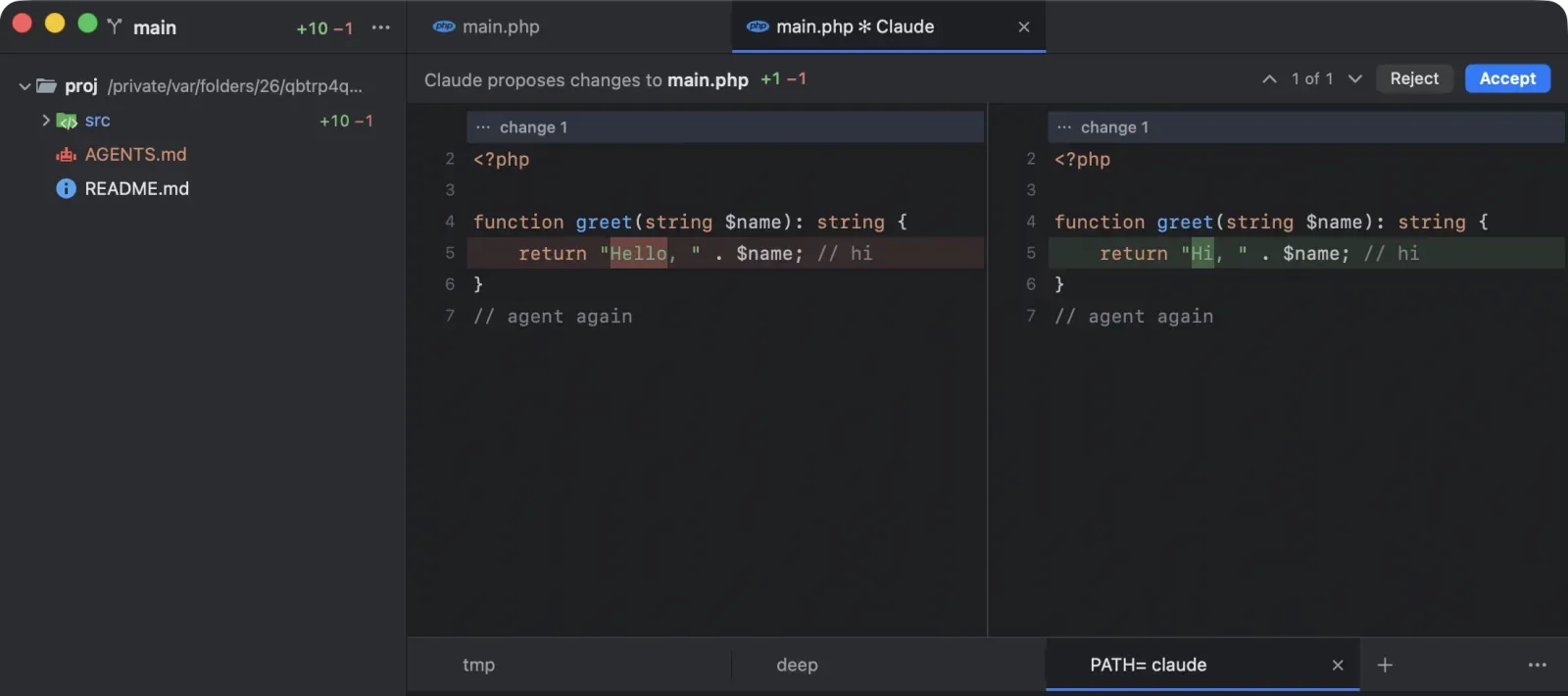
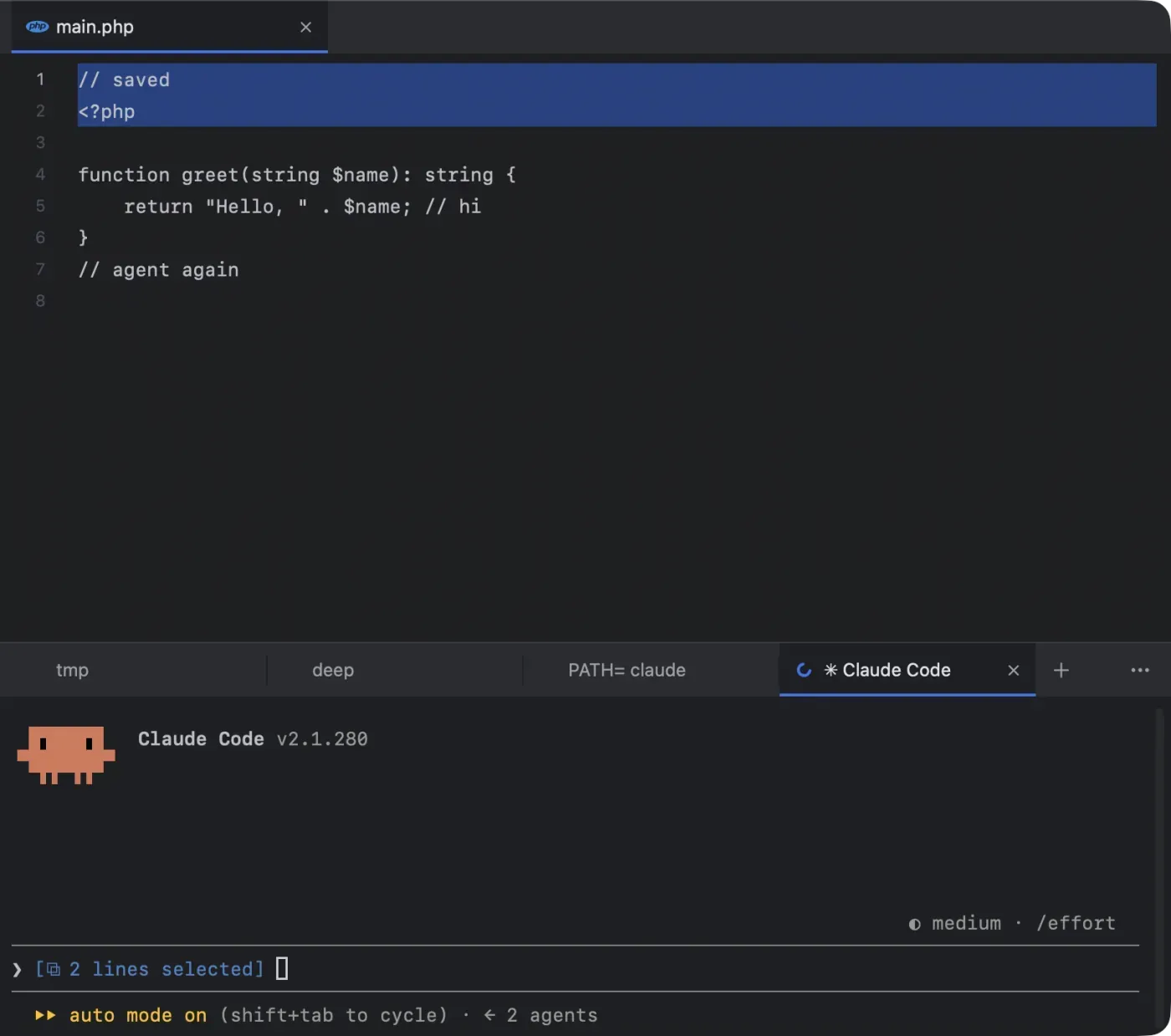
Select lines and Claude gets them with your next prompt (“⧉ 10 lines selected”). Nothing to install or configure.
Edits you approve
Claude’s proposed changes open as a side-by-side diff. Accept with ⌘↩︎, or Reject. Gemini CLI and Qwen Code work the same way.
Send to Agent, for every agent
⌥⌘K types your selection or files into the agent’s prompt in its own syntax:
@app/User.php#L10-20for Claude,app/User.php:10-20for Codex. It never presses Return for you.
One agent can run the others
Next Term is an MCP server. Ask Claude Code, Codex or any agent that speaks MCP to open your projects, start other agents in new tabs, on your Mac or on your servers, give them their tasks, wait for them and read what they did. You watch every tab, and step in whenever you like.
Open ~/Code/api and ~/Code/web. Start Claude Code in api and Codex in web, give each its task, wait for both, and tell me what each one changed.
Sees every tab
Every project and tab, with each agent’s state: working, done, failed, or waiting on a decision, with the question.
Acts as you would
Opens projects, starts agents in new tabs or split panes, types prompts, waits until an agent stops, reads its screen, answers its questions.
Uses the editor
Your selection, the open files, any file opened at a line, and each project’s files, search and git changes, with secrets left out.
Set up for you
In Claude Code, Codex, Gemini CLI, Qwen Code, Cursor Agent, opencode, Copilot CLI, Amp, Junie and Command Code. Only its own entry is written, comments kept.
Asks before it acts
Typing into a tab, answering an agent and closing a tab are marked as destructive, so agents ask first. No agent can type into its own tab.
Private
A socket only you can open, and no network port. Settings turns it off and removes the entries.
18 tools for the projects, tabs and editor on your Mac
list_tabsread_tabwait_for_tablist_projectsget_editor_selectionget_open_filesread_filefind_in_filesgit_statusget_diffopen_projectnew_tabsend_to_tabpress_keysanswer_agentshow_tabclose_tabopen_in_editor
7 more for your servers
list_hostsadd_hostremove_hostcheck_hostnew_remote_tabhost_sessionshost_changes
Agents on your own servers
Shell › New Remote Tab… (⌥⌘T) opens a tab on any server you reach with ssh. Start Claude Code or Codex there, close the lid, and with tmux or herdr on the server the agent keeps working; open the Mac again and the tab is back where it was.
Your ssh, as you set it up
Your
~/.ssh/config, keys,ProxyJumpand key agents such as 1Password apply. Tabs on one server share a connection, so you log in once.Kept running
With tmux or herdr, a session outlives a sleeping Mac or a dropped network. The tab reconnects by itself, and comes back at the next launch.
The same marks
Agents on a server get the spinner, the check, and the amber “!” with the question, and your agents can open tabs there through MCP.
An editor where the agents work
A real code editor
Above the terminal: colours from 112 grammars, soft wrap, ⌘P to go to a file, ⌘/ to comment, ⌘L to go to a line. When an agent changes an open file, the editor follows.
Changes side by side
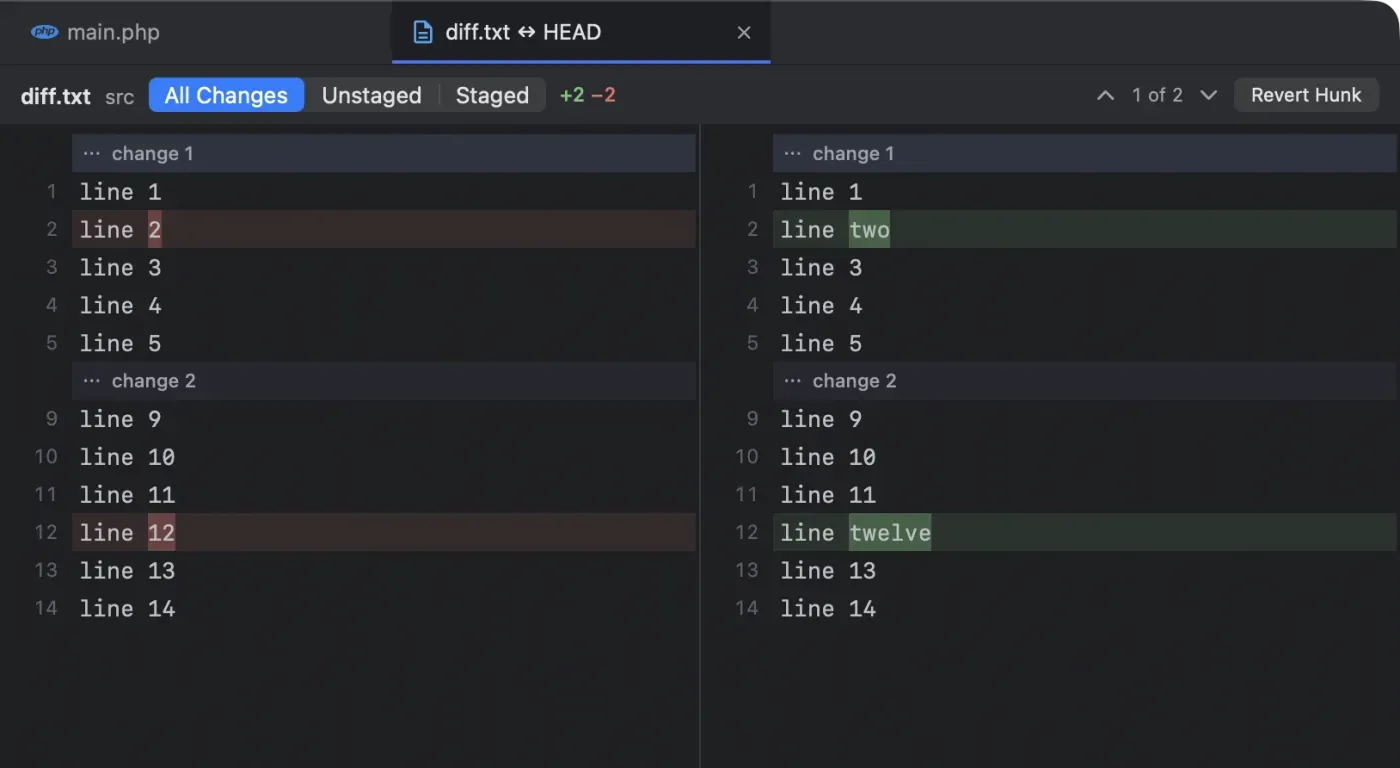
⌥⌘G shows old beside new, changed words marked. Stage, unstage or revert one hunk at a time; each action checks the file first, so an agent’s edit is never overwritten.
Git at a glance
The project sidebar colours changed files and shows +12 −3 per file and folder, like a pull request, with the branch and ahead/behind at the top. In the editor’s gutter, a bar marks each added or changed line as you or an agent type.
Paths in the output open
⌘-click
src/app.ts:42:7, or a Python traceback’sFile "graph.py", line 42, and the file opens at that line. pytest and ruff lines work too.Find and Replace in Files
⇧⌘F and ⇧⌘R across the project, with regular expressions, file masks and a preview of every replacement.
Git, from branch to blame
The branch popup
Click the branch, or press ⌥⌘B: one search over branches and actions. Update Project, Commit… and Push… each show what they would do (
↓3,+41 −10,↑2).Nothing behind an agent’s back
It asks before changing files under a working agent, keeps your uncommitted changes in a named stash when you switch, and every deleted branch has Undo.
Commits you can read
Commit… shows exactly what goes in and calls out files that look like secrets. Let Agent Commit hands it to your agent instead.
The Git Log
⌥⌘L opens the history as a graph in a tab, with branch, author, date and path filters, each commit in full, and its changes side by side.
Blame in the editor
View › Annotate with Git Blame shows who last changed each line, and when, beside the line numbers, the newest work brightest. Click one for its commit in the Git Log.
Every command written down
Git › Git Commands lists each git command Next Term ran for you, exactly as it would be typed.
Notebooks, data and databases
Jupyter notebooks
An
.ipynbopens as cells with their saved outputs: Markdown laid out, code coloured, images shown, errors in red. Nothing runs, and Open as JSON is one click away.Large data files
A JSON Lines, CSV or TSV file over 2 MB opens in a head view: its first 1,000 rows as a table, as quickly for a 2 GB file as for a small one.
Prompts read as prompts
{context}placeholders and{{ question }}templates inside Python strings get their own colour, and Prompty, Mermaid and Cypher files have grammars of their own.Your project’s databases
The databases a project names in its own files (
DB_*keys,DATABASE_URL, Prisma, Drizzle, Supabase, SQLite files) sit in the sidebar, local or remote, password masked.SQLite, read-only
A SQLite file opens in a tab: its tables, 1,000 rows a page, Copy As CSV, JSON or Markdown, and Send to Agent.
Hand-offs
Open in TablePlus, or mysql and psql in a new tab for a local database. The password goes through a private file that is deleted at once, never the command line.
Made to fit how you work
Split panes
⌘D splits a tab right, ⇧⌘D down; ⌥⌘ and the arrows move between panes. The tab shows the mark of the pane that most needs you.
Go to File
⌘P and a few letters:
usrctlfindsUserController.php. Add:42for the line.Your layout
The terminal below, beside or above the editor; the sidebar on the left or right.
nxtrmin any terminalnxtrm .opens a project;nxtrm app/User.php:42opens a file at a line.Every menu shortcut is yours
Change any of them in Settings (⌘,), or keep the keys you know from another editor.
Bring your settings over
From VS Code, Cursor, a JetBrains IDE, Zed, iTerm2, Ghostty or Terminal: your shortcuts, fonts, terminal colours and recent projects. You see each change first, and one click undoes it.
Pick up any conversation
The Welcome window lists the sessions Claude Code, Codex and Command Code kept for each project. Resume or Fork one in a tab; ⌥⌘O does it in a project window.
Tabs that serve
A tab running
npm run dev,uvicornorlanggraph devshows its port, such as “app · :5173”, and Shell › Open Served URL opens it.Updates in one click
Signed with the release key and checked before anything is replaced.
Works with the agents you already use
Next Term brings no AI of its own and needs no account. It runs the agent command-line tools you install, and anything else you run in a terminal: tests, dev servers, ssh.
Connected as their IDE
Status, live selection, proposed edits as diffs, MCP tools, Send to Agent
- Claude Code
- Gemini CLI
- Qwen Code
Recognised by name
Status on the tab, decisions as notifications, Send to Agent; MCP tools set up for Codex, Cursor Agent, opencode, Copilot CLI, Amp, Junie and Command Code
- Codex
- Command Code
- Junie
- opencode
- Aider
- Amp
- Cursor Agent
- Goose
- Crush
- GitHub Copilot CLI
- Droid
- Kiro
- Amazon Q
- Kimi
- Plandex
- Cline
- Auggie
Local by design
Your code stays on your Mac
The agent links listen on
127.0.0.1only and refuse browsers; the MCP server uses a private socket, with no network port.A fresh token every launch
A new 256-bit secret each time Next Term starts.
.envfiles and keys are never shared.No account, no telemetry
On its own, Next Term only checks GitHub for updates once a day and fetches from your projects’ own git remotes. You can turn off either.
Databases stay put
Found by reading the project’s files, never by running its code. Passwords are never shown, logged, copied or handed to an agent.
Your servers, your ssh
Host keys are never accepted silently, no password is stored, and nothing on a server can reach back to Next Term.
Open source, MIT
Read every line on GitHub. Releases are built from it by GitHub Actions, with a SHA-256 checksum for every download.
Install in a minute
In one line, from the terminal:
curl -fsSL https://nxtrm.mishuk.me/install.sh | bashIt checks that the release’s checksum is signed with the Next Term release key and that the download matches it, then copies Next Term to Applications, with no sudo, and macOS doesn’t ask you to allow the first launch. Read the script. Or with the disk image:
- Download NextTerm.dmg, the latest version (0.9.0), straight from its release on GitHub.
- Open it and drag Next Term to Applications.
- Allow the first launch. Next Term is not notarized. On macOS 15 and later, open Next Term once, then go to System Settings → Privacy & Security and click Open Anyway. On macOS 13 and 14, right-click the app, choose Open, then Open again.
- Choose a folder to work in. Next Term opens it as a project, and reopens it next time.
Optional: download its checksum next to it and check it with shasum -a 256 -c NextTerm.dmg.sha256. After this, Next Term updates itself.
What comes next
- Coming next Sessions from more agents. The conversations Gemini CLI, opencode, Copilot CLI and Cursor keep, in the Welcome window beside Claude Code’s, Codex’s and Command Code’s.
- Coming later A server’s files in the editor and sidebar, next to its remote tabs, and then dev containers.
- Coming later Remote access to the MCP server for agents that do not run on your Mac, such as ChatGPT and Claude on the web, through a secure link.
Questions
Is Next Term free?
Yes. It is free and open source under the MIT licence, with no account and no paid tier. The source is on GitHub.
Does it come with its own AI?
No. Next Term runs the agent command-line tools you already use, such as Claude Code, Codex and Gemini CLI, signed in the way each of them normally is.
Does Next Term send my code anywhere?
No. The agent links listen only on your Mac, with a fresh token each launch, and never share .env files or keys. On its own, Next Term makes only a daily update check to GitHub and background fetches from your projects’ own git remotes, and you can turn off either.
Can one agent control the others?
Yes. Next Term is an MCP server, set up for you in Claude Code, Codex, Gemini CLI and seven other agents. An orchestrator can list every tab with its agent’s state, start agents, send them prompts, wait for them and read their screens. It works only on your Mac, and Settings turns it off.
Can my agents run on a server?
Yes. Shell › New Remote Tab… (⌥⌘T) opens a tab on any server you reach with your own ssh. With tmux or herdr, the session keeps running while your Mac sleeps, the tab reconnects by itself, and its agent gets the same marks as one on your Mac.
Why does macOS ask me to allow the first launch?
Next Term is not notarized by Apple. Allow it once with Open Anyway in System Settings → Privacy & Security (macOS 15 and later), or right-click › Open (macOS 13 and 14).
Run your agents side by side
Version 0.9.0 for macOS 13 or later. Free, open source, about a minute to install.