
Side-by-side diffs
An agent just touched twelve files. Before you commit, you want to see each change the way a pull request shows it, keep the good parts and throw out the rest. Changes side by side does that in a tab, next to the terminal where the agent is still running.
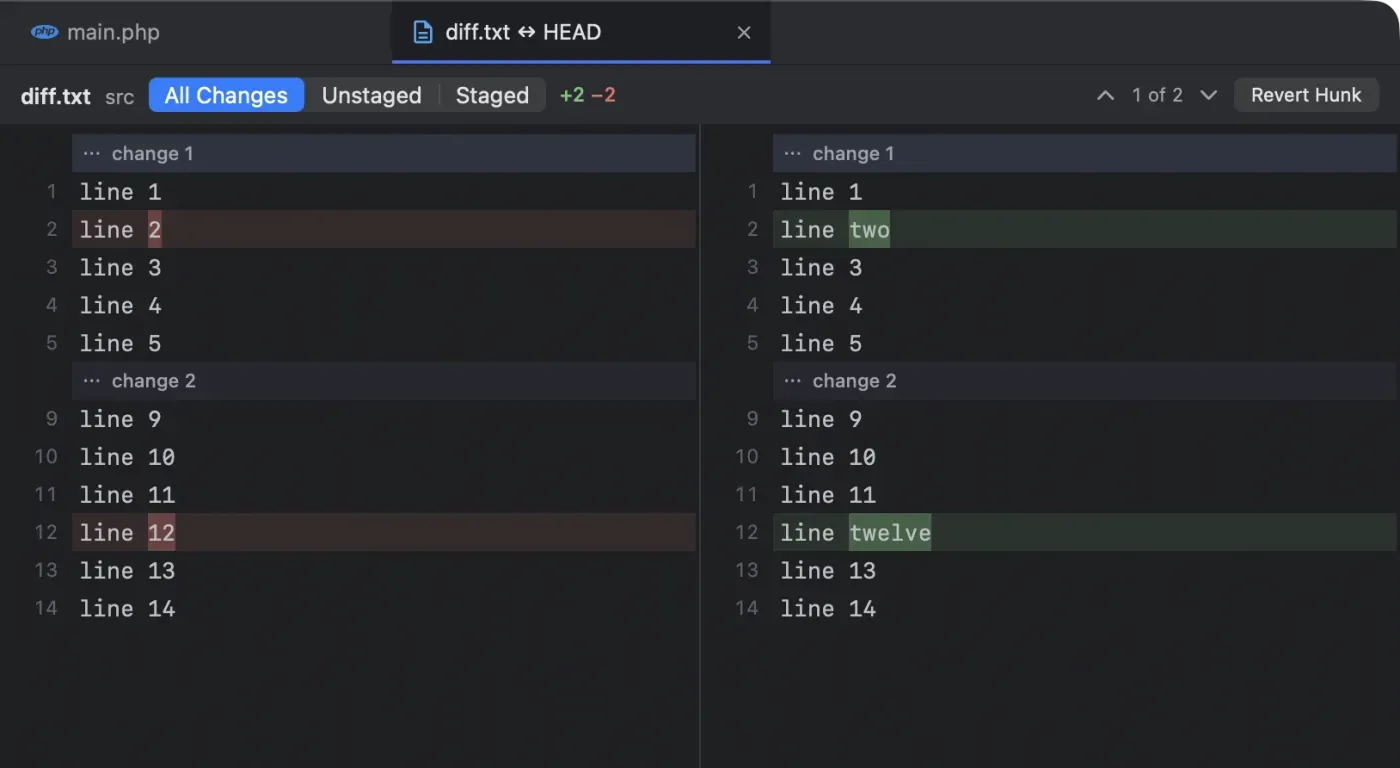
Open a diff
Section titled “Open a diff”- Press ⌥⌘G (View › Show Changes) to see the changes of the file you are editing.
- In the project sidebar, select a changed file and press ⌥⌘G, or right-click it and choose Show Changes.
The file has to be in a git repository: changes are shown against the last commit.
Read it
Section titled “Read it”- Old on the left, new on the right, rows aligned so a changed line sits next to its old self.
- Removed lines are tinted red, added lines green, and the words that changed within a line are marked more strongly.
- Both sides are syntax-coloured with the editor’s grammars, and scroll together.
- The header shows the file, its folder, and the
+and−line counts. - Step through the changes with the arrows (“1 of 2”). Scrolling also picks the change at the top of the view, and clicking a row picks its change.
- The diff refreshes by itself when the file or the git index changes: an agent’s next edit, a commit, a stage.
All changes, unstaged or staged
Section titled “All changes, unstaged or staged”The switch at the top chooses what to compare:
| View | Compares | Tab title |
|---|---|---|
| All Changes | The file on disk against the last commit | file ↔ HEAD |
| Unstaged | The file on disk against the index | file ↔ Index |
| Staged | The index against the last commit | file ↔ HEAD |
A branch’s diffs open from the branch popup, read-only: file @ feat/x is what that branch changed since it parted from yours, and file ↔ feat/x is the file on disk against that branch. See Compare a branch.
Stage, unstage or revert one hunk
Section titled “Stage, unstage or revert one hunk”Act on the current change (the hunk) with the buttons on the right:
- Stage Hunk (in Unstaged) adds just those lines to the index, like
git add -p. - Unstage Hunk (in Staged) takes them out again.
- Revert Hunk (in All Changes and Unstaged) puts those lines back the way they were. Next Term asks first, and ⌘Z undoes it.
You build a clean commit out of an agent’s work one hunk at a time, without leaving the window and without remembering git add -p’s keys.
Send lines to your agent
Section titled “Send lines to your agent”Select lines on the new side (the right) and press ⌥⌘K (Edit › Send to Agent): the agent in your tab gets the file at those lines, in its own syntax, as from the editor (@app/User.php#L10-20 for Claude Code, app/User.php:10-20 for Codex). A selection on the old side picks the same rows, and the new side’s lines in them are sent. With nothing selected, the file is sent. See Send to Agent.
- Staged: the index isn’t the file on disk, so the reference says “(as staged)” and the selected lines are pasted after it.
- A past commit: the reference says “(as of commit 4cc062d)”, with the selected lines pasted after it.
- Removed lines only: select red lines on the old side and they are pasted after the reference, which says “(lines removed)”: the file no longer has them.
- A deleted file is sent as “(deleted)”, with any lines you select pasted after it.
- An agent’s proposed edit: nothing is sent. The agent is waiting for your answer in its terminal; accept or reject first.
Lines pasted from two changes at once have a ⋯ line where the diff skips the unchanged lines between them. More than 200 lines (or 16 KB) are not pasted: the reference goes alone, and a selection of removed lines that large sends nothing.
Safe while agents keep working
Section titled “Safe while agents keep working”Agents keep editing while you review. Each hunk action first checks that the file, or the index, is exactly what the diff was made from, by its full git blob id. If anything changed in the meantime, nothing is touched: Next Term tells you, refreshes the diff, and you try again on what is really there. (Plain git apply would place a stale hunk at an offset instead of failing.)
Other guards:
- Unsaved edits: reverting a change in a file with unsaved edits in the editor is refused until you save or close it.
- Git is busy: if another git command holds the index lock (an agent committing, say), Next Term says so; try again in a moment.
- Undo is careful too: ⌘Z after a revert restores the file only if nothing changed it since.
Proposed edits from agents
Section titled “Proposed edits from agents”When Claude Code, Gemini CLI or Qwen Code proposes an edit, it opens in the same kind of diff tab with Accept (⌘↩︎) and Reject instead of the hunk buttons. See Proposed edits open as a diff.
A file in a past commit
Section titled “A file in a past commit”In the Git Log, double-click a file in a commit’s changed files to see what that commit did to it, against the commit before. The tab is titled like app.txt @ 4cc062d and is read-only: a commit never changes, so there is nothing to stage or revert.
Coming next
Section titled “Coming next”Coming soon Folding long unchanged runs, staging selected lines, and editing the proposed side of an agent’s change before you accept it.